
The problem of using smartphones while walking attracted the attention of mobile device manufacturers several years ago. One attempt to address this problem was the Walk Mode app, developed by Samsung's research division in India. It was designed to warn people who continue using their smartphones while moving. Unlike ordinary walking or fitness apps, Walk Mode focused specifically on the safety of pedestrians using smartphones.
What Walk Mode is and how the app works
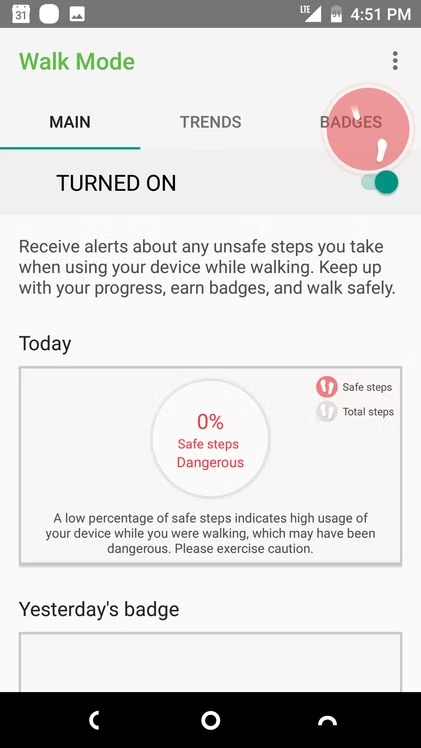
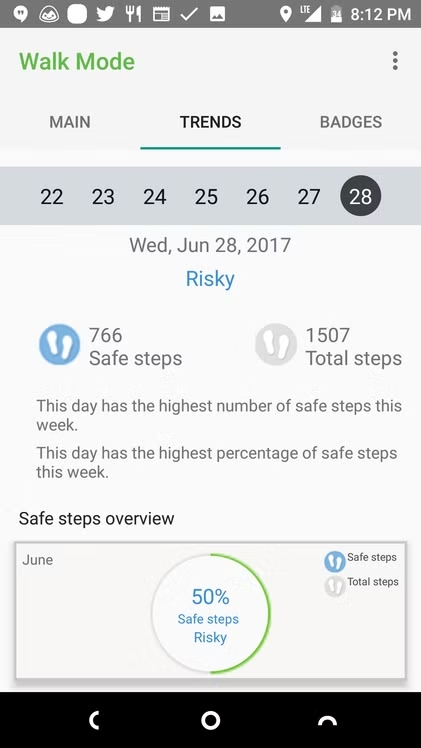
Walk Mode was developed by Samsung R&D Institute India Noida and was designed to monitor smartphone use while walking. The app used smartphone sensors to detect movement and was intended to warn users when their walking became potentially unsafe. It included several features: warnings about unsafe walking, a Safe Walker reward system for safe steps, the ability to hide lock-screen notifications while walking, and a car horn detection feature.
The warning system itself is particularly interesting. When Walk Mode was running, a small indicator appeared on the screen to show that the app was monitoring the situation. When a potential danger was detected, the warning became more noticeable. According to Samsung's description, the app could also recognize car horns and alert the user. In this way, Walk Mode attempted to take into account not only the pedestrian's own movement but also certain external signs of potential danger.
Interestingly, the developers of Walk Mode viewed it primarily as a way to remind users to stop using their phones while walking, rather than as a fully fledged pedestrian protection system. In its app description, Samsung explicitly stated that using a mobile phone while walking should be avoided, and that the purpose of Walk Mode was to remind users of this.
User reviews and practical tests

Practical tests of Walk Mode showed that the idea itself was interesting, but the implementation had some noticeable limitations. For example, a journalist from The Next Web installed the app on a Galaxy S6 and found that it did work, but it mainly warned about objects located directly in front of the lower part of the smartphone. As a result, the app failed to warn the tester in several situations where there was a wall ahead. This significantly limited the system's practical value, since a pedestrian may encounter danger much higher up or farther away than the area this type of analysis can detect.
Another problem was the warnings themselves. A user on Samsung Community noted that the app warned them about unsafe walking too frequently, approximately once a minute, which became annoying. A Samsung representative confirmed that these warnings were a standard feature of the app.
In addition, third-party reviews noted potentially increased battery consumption and the large number of permissions required for the app to work. The car horn detection feature also required microphone access, while movement and position tracking relied on the corresponding sensors and GPS.
Overall, Walk Mode was an interesting early Samsung experiment in pedestrian safety, but its capabilities were limited. The app attempted to detect unsafe walking and certain signs of potential danger, but it did not create a complete picture of the environment in front of the pedestrian.
Walk Mode vs Smombie Assistant

There is an obvious similarity between Walk Mode and the Smombie Assistant concept. Both address the same problem: a person continues looking at their smartphone while walking and may therefore fail to notice a danger ahead. Both use the capabilities of the smartphone itself and act as an additional layer of user warnings.
However, the underlying approaches are different. Walk Mode primarily detected smartphone use while moving and warned users about unsafe walking. Smombie Assistant proposes a different approach: identifying a specific potentially dangerous object or area in front of the pedestrian. To do this, it uses the smartphone's main camera and image analysis.
In the Smombie Assistant concept, these visual indicators are primarily yellow tactile tiles and yellow warning lines. This means there is no need to try to recognize every object in the surrounding environment. The module first searches for characteristic yellow elements and then analyzes their shape and position. If a detected object matches the characteristics of a warning element, the user receives an appropriate notification.
There is another important difference. Walk Mode was a standalone mobile app, whereas Smombie Assistant is designed as an Android system feature that can run in the background without requiring users to interact constantly with a separate app. This would allow the concept to be integrated directly into the smartphone and activated depending on the situation.
Finally, Smombie Assistant is designed to support integration with SmombieNET. In this case, information about the module's alerts could be used not only to warn an individual. Anonymized data about the time of an event, its type, movement speed, and location could be combined with data from other users. This would make it possible to analyze locations where pedestrians regularly encounter potential dangers.
Conclusion
Walk Mode shows that the idea of protecting people from the consequences of using smartphones while walking emerged among mobile device manufacturers quite some time ago. Samsung attempted to address the problem through movement detection, warnings about unsafe walking, and car horn recognition. However, practical tests revealed the limitations of this approach. The Smombie Assistant concept proposes taking this idea further: instead of giving a general warning that someone is walking while looking at their smartphone, it aims to identify a specific visual sign of danger ahead. Integration with SmombieNET adds another level by making it possible to use the accumulated data not only for individual safety, but also to analyze pedestrian infrastructure safety.
This is what makes Walk Mode particularly interesting for the SmombieNET project: it is not simply a competing technology, but evidence that a major smartphone manufacturer has already attempted to address the very problem that Smombie Assistant is being developed to solve.